Mulch Calculator for Garden Beds and Landscapes

 Estimate how much mulch your garden beds and landscaped areas need, compare bulk and bagged purchases, and learn how depth, material type, bed shape and correct application affect coverage and plant health.
The Mulch Calculator estimates how much material is required to cover garden beds, tree circles and landscaped areas at a selected depth. It can calculate the required volume, round the order up to whole bags or bulk delivery increments, compare material costs and estimate how much ground an available quantity of mulch will cover.
The calculator supports rectangular, circular, oval and known-size areas, as well as multiple beds and excluded sections. Measurements can be entered in US or Metric units, making the tool useful for both small planting borders and larger landscape projects.
A reliable mulch estimate begins with the net area and the additional layer actually required. Measure the bed itself, subtract sections that will remain uncovered and check how much settled mulch is already present before selecting a new depth.
How to use the Mulch Calculator
The calculator updates automatically whenever a value or option changes. There is no separate calculation button, so the results can be checked immediately while adjusting the area, mulch depth, allowance or purchase settings.
1. Choose the calculation mode
Begin by selecting the task you want to complete:
- Mulch Needed: Calculates the volume and purchase quantity required for a measured area.
- Area Covered: Calculates how much ground can be covered by mulch that you already have or plan to buy.
The first mode is useful when preparing a new order. The second is helpful when you have a fixed delivery volume or a known number of bags and want to understand the potential coverage.
2. Select the measurement system
US is selected by default and uses feet, inches, square feet, cubic feet and cubic yards. Metric uses metres, centimetres, square metres, litres and cubic metres.
Each system has practical default values when the calculator is first opened. If you change a measurement and then switch systems, your entered values are converted rather than replaced. This allows the same project to be reviewed in either system without entering all dimensions again.
3. Enter the areas to cover
Select the shape that best represents the first planting area:
- Rectangle: Enter the length and width.
- Circle: Enter the full diameter across the centre.
- Oval: Enter the long and short diameters.
- Known Area: Enter an area that has already been measured or calculated.
Use Identical areas when several beds have the same dimensions. The Add Another Area option can be used for beds with different shapes or sizes. Each added area is included in the total calculation.
If part of the measured space will not receive mulch, select Subtract Area and enter its size. This can account for paving, large rocks, water features, structures or other uncovered sections. The excluded area must be smaller than the combined total area.
4. Choose the mulch type and depth
Selecting a mulch type provides a general depth reference for that material. Enter the intended layer using the depth field, the slider or the step controls. A warning appears when the selected depth falls outside the common range for the chosen material.
The warning does not prevent calculation. It is a practical prompt to reconsider whether the layer is appropriate for the material and planting situation.
5. Set the extra allowance
The allowance adds extra material for uneven ground, small measurement differences, settling and minor losses during installation. The available range is 0–30%, with 10% providing a useful starting point for many ordinary projects.
A simple rectangular bed that has been measured carefully may need only a modest allowance. Complex borders, sloped ground and beds containing many permanent features often justify a larger margin.
For an existing mulched bed, enter only the additional depth required. If the target layer is 3 in and approximately 1 in remains, calculate a 2 in top-up rather than another complete 3 in layer.
6. Configure the purchase settings
The calculator can prepare the result for bulk mulch, bagged mulch or both:
- Bulk: Select an order increment of 0.25, 0.5 or 1 cubic yard or cubic metre.
- Bags: Select a standard package size or enter a custom bag volume.
- Compare Both: View the rounded bulk order and number of bags together.
Cost comparison is optional. Select a currency and enter the bulk price per cubic yard or cubic metre and the price per bag. The calculator then displays the estimated material cost and the difference between the two formats.
| Calculator field | What to enter | Practical guidance |
|---|---|---|
| Area dimensions | Length, width, diameter or known area | Measure the outer edge of the section that will actually receive mulch |
| Identical areas | Number of matching beds | Use only when the shape and dimensions are the same |
| Excluded area | Total uncovered space | Combine paving, structures and other unmulched sections into one value |
| Mulch depth | Additional layer required | Account for mulch already remaining in an established bed |
| Allowance | 0–30% | Add more for irregular edges, settling and difficult measurements |
| Bag size | Volume printed on the package | Do not use the bag weight because mulch is purchased by volume |
Interpreting the results
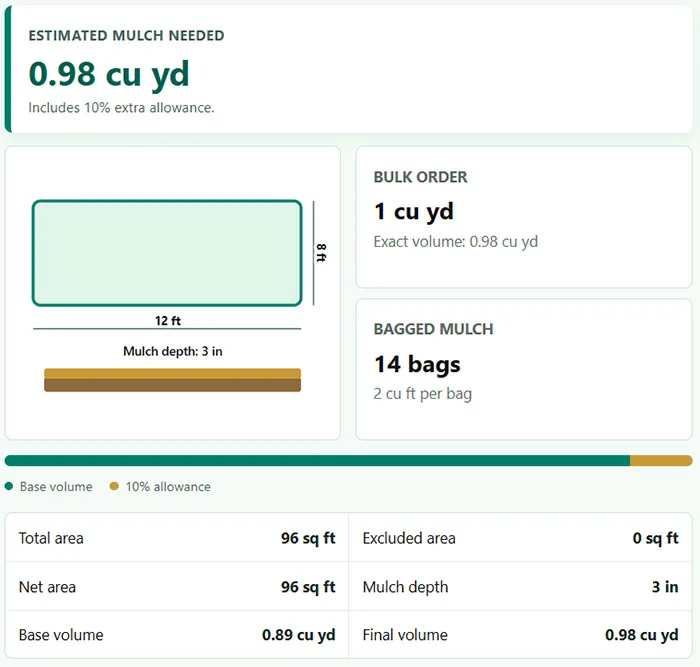
The main result displays the final mulch volume after the selected allowance has been added. In US mode this value is shown in cubic yards; in Metric mode it is shown in cubic metres.
The purchase cards convert that exact volume into quantities that can realistically be ordered. Bulk material is rounded upward to the selected delivery increment, while bagged material is rounded upward to a whole number of bags. This prevents a mathematically exact result from producing an order that is too small.
| Result | Meaning | How to use it |
|---|---|---|
| Estimated mulch needed | Final volume including allowance | Use as the target volume before purchase rounding |
| Bulk order | Volume rounded up to the selected increment | Use when requesting a loose mulch delivery |
| Bagged mulch | Number of complete bags required | Match the result to the package size selected in the calculator |
| Price difference | Difference between bulk and bagged material costs | Compare material prices before considering delivery or handling fees |
| Total area | Combined area before exclusions | Check that all beds and quantities were entered correctly |
| Net area | Area remaining after exclusions | This is the actual surface used in the volume calculation |
| Base volume | Volume before allowance | Useful for separating measured need from the additional margin |
| Final volume | Base volume plus allowance | Use this value when planning the purchase |
The coloured volume bar separates the base quantity from the allowance. The 2D diagram provides a visual reference for the first entered area and displays its main dimensions and selected mulch depth. It is a schematic guide rather than a scaled landscape plan.
How the volume is calculated
The calculator first determines the surface area of every section:
- Rectangle: length × width
- Circle: π × (diameter ÷ 2)²
- Oval: π × (long diameter ÷ 2) × (short diameter ÷ 2)
It then combines the areas, applies the number of identical sections and subtracts the excluded area. The mulch volume is calculated from the net area and layer depth:
Base volume = net area × mulch depth
Final volume = base volume × (1 + allowance percentage)
Example calculation
A rectangular bed measuring 12 ft by 8 ft has a total area of 96 sq ft. At a depth of 3 in, the base requirement is 24 cu ft, or approximately 0.89 cu yd. Adding a 10% allowance increases the result to approximately 0.98 cu yd.
With a 0.5 cu yd bulk increment, the order is rounded to 1 cu yd. If mulch is sold in 2 cu ft bags, the same project requires 14 complete bags.
When I plan a project, I use the final volume as the buying target but still check the supplier’s delivery increments and bag labels. The exact calculation and the quantity that can actually be purchased are related, but they are not always identical.
Understanding Area Covered mode
In Area Covered mode, the calculation works in reverse. Enter an available bulk volume or number of bags, select the mulch depth and the calculator returns the estimated coverage area.
A deeper layer covers less ground with the same amount of material. For example, doubling the depth approximately halves the potential coverage. This mode is particularly useful when using leftover bags or deciding whether an available bulk delivery is sufficient for another bed.
Choosing the right mulch depth
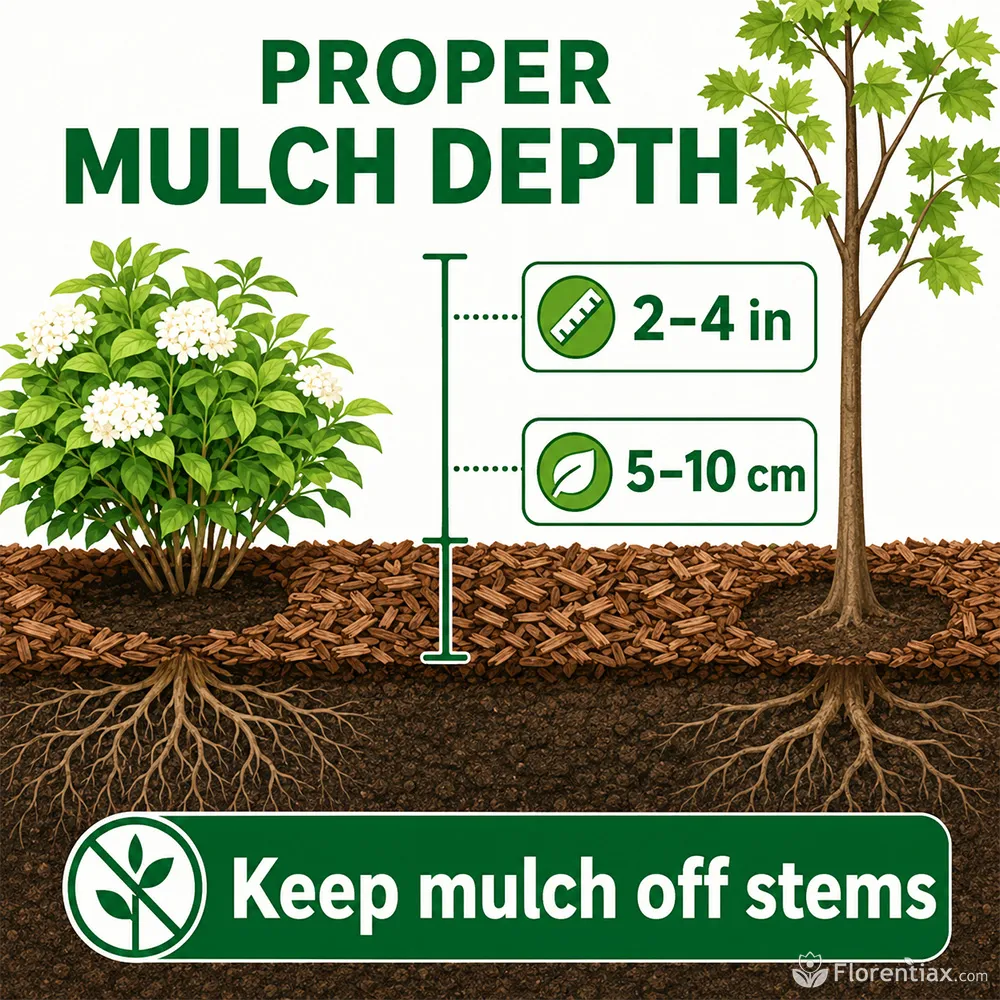
Mulch depth affects weed suppression, moisture retention, soil temperature and air movement around the upper root zone. A very thin layer may provide limited coverage, while an excessive layer can remain wet, reduce gas exchange and encourage roots to grow too close to the surface.
The most suitable depth depends on mulch texture, climate, soil condition and whether the bed is newly mulched or being topped up. The calculator uses the following general ranges as practical reference points.
| Mulch material | Common US depth | Common Metric depth | Typical use |
|---|---|---|---|
| Bark mulch | 2–4 in | 5–10 cm | Shrub borders, ornamental beds and tree circles |
| Wood chips | 3–4 in | 7.5–10 cm | Paths, perennial beds and larger landscaped areas |
| Shredded hardwood | 2–3 in | 5–7.5 cm | Slopes and beds where interlocking material is useful |
| Pine straw or needles | 3–4 in | 7.5–10 cm | Shrubs, acid-tolerant plantings and light textured coverage |
| Straw | 4–6 in | 10–15 cm | Vegetable gardens and seasonal crop protection |
| Compost | 1–2 in | 2.5–5 cm | Surface feeding and organic top-dressing |
| Rubber mulch | 1.5–2 in | 4–5 cm | Decorative landscape applications where permitted |
These ranges are starting points rather than universal rules. Fine compost forms a dense layer and is normally applied more thinly than coarse wood chips. Straw is light and open, so a deeper initial layer may be needed before it settles.
Mulch works best when it protects the soil surface without sealing it. Understanding plant roots helps explain why the upper soil layer still needs oxygen as well as moisture.
Mulch also cannot correct a persistently waterlogged bed. If water remains on the surface or the soil stays saturated for long periods, improve soil drainage before adding a thick moisture-retaining layer.
Keep mulch away from trunks, stems and plant crowns. Leave a visible air gap rather than building a mound around the plant. A mulch volcano can trap moisture against bark, conceal damage and create favourable conditions for decay.
Bulk mulch or bagged mulch
Bulk and bagged mulch can provide the same final material volume, but they suit different project sizes and working conditions. The cheapest listed material price is not always the most practical choice once delivery, storage and handling are considered.
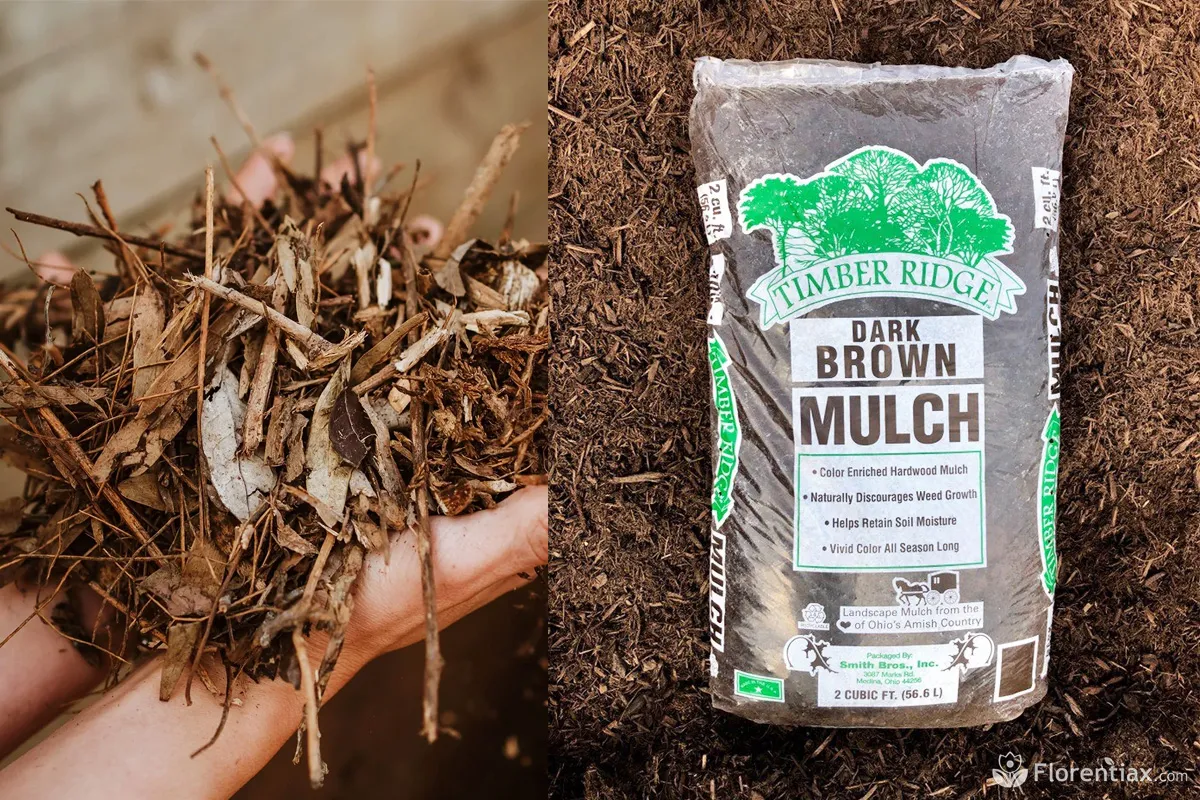
| Buying format | Advantages | Limitations | Usually suitable for |
|---|---|---|---|
| Bulk delivery | Lower unit cost for large volumes; less packaging; faster coverage of large beds | May require a minimum order, delivery access and space for unloading | Large gardens, several beds and landscape renovation |
| Bagged mulch | Easy to transport, count, store and distribute around the property | Higher unit cost and more packaging for large projects | Small beds, top-ups and areas with limited access |
| Mixed purchase | Bulk material covers the main area while bags handle later adjustments | Colour and texture may differ between batches or suppliers | Projects where precise finishing is important |
When comparing prices, use matching volumes. A bulk price is usually quoted per cubic yard or cubic metre, while a bag is labelled in cubic feet or litres. Bag weight should not be substituted for volume because moisture content and material density can change the weight considerably.
The calculator’s cost comparison covers the entered material prices. Delivery fees, pallet deposits, taxes, equipment rental and labour should be considered separately.
Colour can vary between batches of natural mulch. For a visually prominent bed, buying the full quantity at once reduces the chance of an obvious colour change halfway through the installation.
Measuring garden beds accurately
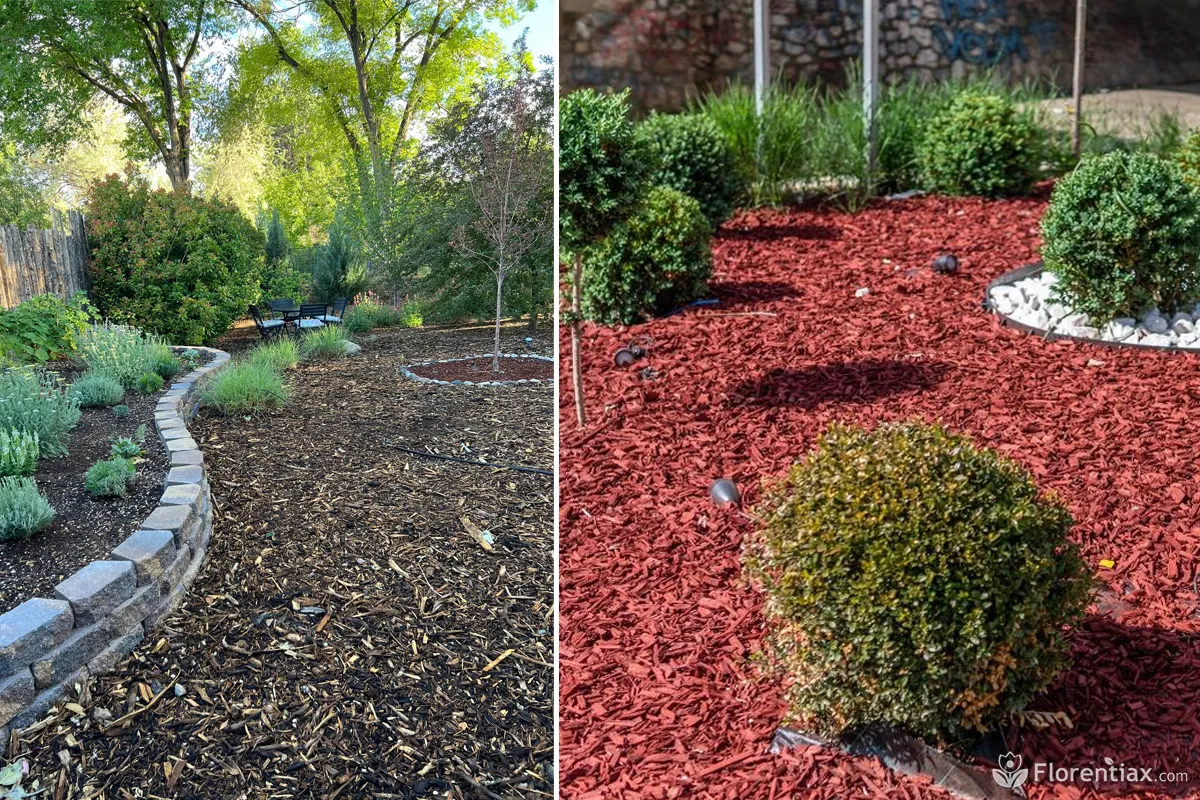
Most garden beds are not perfect geometric shapes. The easiest approach is to divide an irregular space into several simple rectangles, circles or ovals and add them as separate areas. This is usually more reliable than estimating one large average length and width.
Rectangular and narrow borders
Measure along the longest usable edges rather than following every small curve. A long border that changes width can be divided into several shorter rectangles. Enter each rectangle separately so that narrow and wide sections are represented more accurately.
Circular beds and tree rings
Measure the complete diameter through the centre. If a central section must remain clear around a trunk or feature, calculate its area separately and include it in the excluded area.
Do not use the trunk diameter alone as the exclusion. The mulch-free gap should extend beyond the bark so that material does not slide back against the trunk after rain or maintenance.
Oval and curved beds
For an oval, record the longest diameter and the shortest diameter at right angles to it. Highly irregular curved beds can be divided into two or more oval, circular or rectangular sections.
Sloped ground
A steep slope has more surface area than its flat overhead footprint. Measure along the ground surface where practical, or divide the slope into shorter sections. A slightly larger allowance can help with small measuring differences and material movement, but it should not replace proper measurement of a substantial slope.
Raised beds and soil volume
Mulch should be calculated as a surface layer, not as the full internal volume of a raised bed. If the bed also needs to be filled with growing medium, calculate that material separately with the potting soil calculator.
For complex beds, I sketch the space and write each measurement beside its section before opening the calculator. This simple step prevents duplicated areas and makes it easier to identify paving, trunks and other exclusions.
Applying mulch correctly
Correct quantity is only part of a successful mulch project. Preparation and installation determine whether the layer remains useful or creates new plant-care problems.
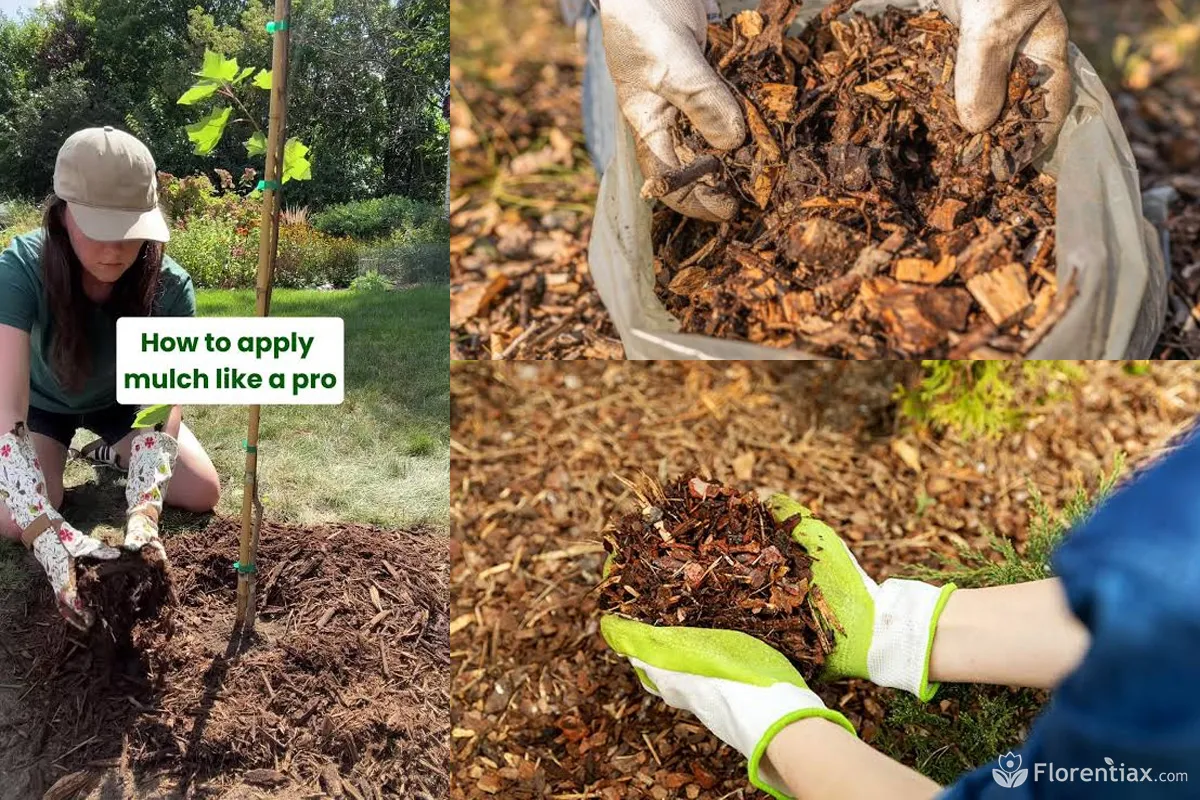
Prepare the surface
- Remove established perennial weeds and unwanted seedlings.
- Rake away excessive, compacted or contaminated old mulch.
- Correct obvious drainage problems and reshape low areas where water collects.
- Water dry soil before mulching rather than trying to wet it through a thick fresh layer.
- Mark irrigation heads, shallow cables and other features that must remain accessible.
Distribute the material evenly
Place small piles across the bed and spread them gradually with a rake or by hand. Periodically check the depth instead of relying only on appearance. Coarse mulch can look deep because of large air spaces, while fine material may form a denser layer than expected.
Avoid mixing wood mulch deeply into garden soil. Surface mulch and soil amendment perform different functions. The distinction is particularly important when comparing soil types and planning how organic materials will be used.
Protect plant bases
Pull mulch back from stems, crowns and trunks after spreading. Small annuals and young seedlings may need a wider open space until their stems become stronger. Plants with crowns close to the soil surface are particularly vulnerable when wet material is packed around them.
Excess mulch does not always reduce watering problems. It can keep an already wet root zone damp for longer, so irrigation should be adjusted after application. The overwatering calculator can help assess the combined effect of watering habits, soil, drainage and environmental conditions.
Check the layer after settling
Organic mulch settles and gradually decomposes. Recheck the depth after several weeks and again before adding another seasonal layer. Top up only the amount that has been lost rather than automatically repeating the original application.
If plants decline while the bed remains persistently wet, inspect the soil and roots instead of hiding the surface beneath more material. A separate root rot risk assessment can help identify whether moisture, drainage and visible symptoms require closer attention.
Common mulching mistakes
Most mulch problems are caused by incorrect depth, poor measurement or unsuitable placement rather than the material itself. The following errors can significantly change coverage or plant response.
| Mistake | Why it causes problems | Better approach |
|---|---|---|
| Entering the full target depth for a top-up | Orders mulch for a new layer without accounting for material already present | Measure the settled layer and enter only the missing depth |
| Ignoring excluded areas | Overestimates material for paving, structures and uncovered features | Combine these spaces and subtract them from the total area |
| Ordering the exact volume | Leaves no margin for uneven ground, settling or purchase increments | Use a reasonable allowance and follow the rounded purchase result |
| Using bag weight as bag size | Mulch density and moisture make weight unsuitable for volume calculations | Enter the cubic feet or litre value printed on the package |
| Piling mulch against stems or trunks | Holds moisture against vulnerable plant tissue | Maintain an open gap around every plant base |
| Covering saturated soil more deeply | May slow evaporation without correcting the underlying drainage problem | Improve drainage and adjust irrigation before adding mulch |
| Adding a complete new layer every year | Can produce excessive accumulated depth | Measure the remaining layer and top up only where necessary |
| Expecting mulch to replace suitable soil | A surface layer cannot correct an unsuitable root-zone structure | Choose the correct soil or mix first, then use mulch as surface protection |
Mulch should support the existing soil and watering routine rather than conceal their problems. Organic surface material can reduce evaporation and moderate temperature, but its performance still depends on the underlying texture, drainage and planting conditions.
Frequently asked questions
Can the calculator handle several beds with different shapes?
Yes. Use Add Another Area for each differently sized bed and select the appropriate shape. The calculator combines all entered sections into one total while preserving their individual measurements.
Why is the bulk order larger than the exact volume?
Loose mulch is commonly sold in fixed delivery increments. The calculator rounds the exact requirement upward to the selected 0.25, 0.5 or 1 volume increment so that the order can be purchased and does not fall short.
Can I calculate mulch for a ring around a tree?
Enter the diameter of the outer circular bed, then subtract the central mulch-free area around the trunk. Keep the finished mulch away from the bark rather than filling the entire calculated circle.
Should old mulch be removed before adding a new layer?
Not automatically. Loose, clean organic mulch can usually remain and be topped up to the desired depth. Remove material that is excessively deep, badly matted, contaminated, sour-smelling or interfering with plant crowns.
Does wet mulch cover a different area than dry mulch?
Moisture can change the weight and handling characteristics, but commercial quantities are normally sold by labelled volume. Use the stated cubic feet, litres, cubic yards or cubic metres rather than estimating from weight.
Can the calculator be used for compost top-dressing?
Yes. Select Compost and enter the intended surface depth. The calculator estimates volume, bags and bulk quantities in the same way, but it does not calculate nutrient content or application rates for concentrated fertilizers.
Can I use the rubber mulch setting for a playground?
The volume calculation can estimate material quantity, but the displayed depth range is intended as a general landscape reference. Playground impact protection must follow the mulch manufacturer’s tested depth, equipment height requirements and applicable local safety rules.
Does the calculation include landscape fabric?
No. The calculator estimates mulch only. Landscape fabric, edging, staples, delivery charges and labour must be measured or priced separately. Fabric area should normally be based on the bed surface plus the overlap required between sheets.
Why does the same mulch volume cover less area at a greater depth?
The available material is being distributed through a thicker layer. Because coverage equals volume divided by depth, increasing the depth reduces the surface area that a fixed volume can cover.